
Chorus: Streamline IBM Verse with Smart Notifications
Overview
Chorus is a lightweight browser extension designed to enhance productivity for users working with IBM Verse. Built for professionals who rely on IBM Verse for email and calendar management, Chorus delivers real-time insights into unread messages and incoming meetings directly within the Chrome browser. The tool provides a seamless interface that integrates into daily workflows, reducing context switching and improving response times. By displaying the number of unread messages in a tooltip—along with sender names and subject lines—it enables users to quickly assess message priority without opening the inbox.
The extension supports customizable keyboard shortcuts for core actions such as opening IBM Verse, composing new emails, and syncing messages. This feature is particularly useful for power users who prefer keyboard-driven navigation over mouse interactions. Additionally, Chorus allows users to initiate searches from any webpage by typing “v” followed by a space in the Chrome address bar, streamlining access to email content without leaving the current context. This functionality is ideal for professionals managing multiple tasks across different platforms.
Developed during work hours by an IBM employee, Chorus is not officially supported by IBM. The developer maintains responsibility for all bug reports and updates, though responses are provided informally. Despite its unofficial status, the extension remains a practical utility for IBM Verse users seeking enhanced visibility and efficiency. It is compatible with Windows and Mac systems, making it accessible to a broad user base.
Key Features & Capabilities
- Unread Message Counter with Tooltip Preview – Displays the number of unread messages in the IBM Verse inbox. Hovering over the icon reveals sender names and subject lines, enabling quick triage without opening the application.
- Customizable Keyboard Shortcuts – Users can assign shortcuts to open IBM Verse, compose new emails, and sync messages, improving workflow speed and reducing reliance on mouse navigation.
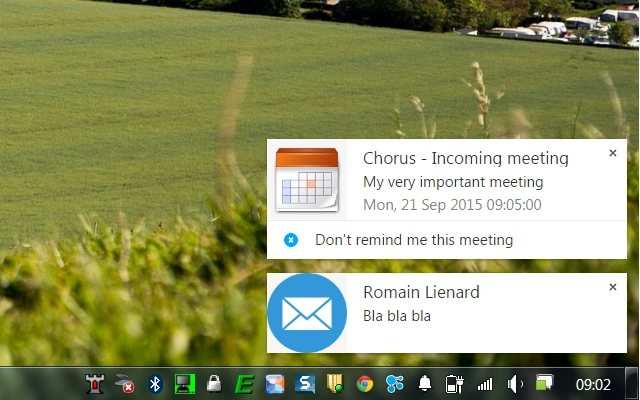
- Enhanced Email and Meeting Notifications – Delivers detailed notifications for incoming emails and calendar invites, ensuring users stay informed without constant inbox checks.
- Web-Based Search Integration – Allows users to start a search directly from any webpage by typing “v” followed by a space in the Chrome address bar, leveraging the Chrome address bar for rapid access to email content.
- W3ID Support (Version 2.0) – Supports W3ID authentication, enabling users to reauthenticate by closing the current tab and clicking the extension icon to open a fresh session.
These capabilities are tailored for professionals who manage high volumes of email and calendar activity. The ability to search from any webpage using a simple prefix makes Chorus particularly effective in multitasking environments. For example, a user reviewing a document can quickly search for a related email thread without switching tabs. Similarly, the notification system ensures that urgent messages or meeting invites are not missed, even during focused work sessions.
User Interface, Workflow & Performance
Chorus features a minimalistic user interface that integrates seamlessly into the Chrome browser’s toolbar. The extension icon is unobtrusive, displaying the count of unread messages and offering a tooltip on hover. The design prioritizes clarity and accessibility, ensuring that users can interpret the status at a glance.
Navigating through the extension’s functions is straightforward. Users can access all features through the icon or via assigned keyboard shortcuts. The workflow is optimized for efficiency, with actions like composing emails or syncing messages requiring minimal steps. The integration with the Chrome address bar for search functionality adds a layer of convenience, especially for users accustomed to command-line-style navigation.
Performance details were not specified by the developer. However, given its 2.8 MB size and lightweight nature, Chorus is expected to have minimal impact on browser performance. The extension does not appear to consume significant CPU or RAM resources based on general behavior patterns of similar tools. Stability is maintained through regular updates, though the developer does not provide official support or guaranteed response times for issues.
Compatibility & System Requirements
Chorus is compatible with Windows and Mac operating systems. It is designed to run within the Chrome browser, requiring no additional software installations. The extension has a file size of 2.8 MB, indicating a compact footprint that should not significantly affect system storage.
Exact system requirements were not listed. Compatibility with specific Chrome versions was not provided. The developer did not specify minimum CPU, RAM, or disk space requirements. Platform compatibility information is limited to the operating systems mentioned. Users should ensure their system meets general Chrome browser requirements for optimal performance.
Pros and Cons
Pros
- Lightweight design with minimal resource usage
- Intuitive interface with clear visual feedback
- Customizable keyboard shortcuts improve workflow speed
- Real-time unread message tracking with preview details
- Search functionality accessible from any webpage
- Supports W3ID authentication for secure access
Cons
- No official support from IBM or the developer
- Updates and bug fixes depend on developer availability
- Limited system requirement details provided
- Compatibility with older Chrome versions not confirmed
- Not available for browsers other than Chrome
FAQ Section
Is Chorus compatible with Chrome on both Windows and Mac?
Yes, Chorus is compatible with Chrome on both Windows and Mac operating systems.
Does Chorus require an IBM Verse account to function?
Yes, the extension is designed to work exclusively with IBM Verse. It requires a valid IBM Verse account and active session to display inbox data and notifications.
Can I use Chorus without an internet connection?
Chorus requires an active internet connection to sync with IBM Verse and retrieve inbox data. Offline usage is not supported.
Is Chorus safe to install and use?
As a browser extension developed by an IBM employee, Chorus operates within standard Chrome security policies. It does not collect personal data beyond what is necessary for integration with IBM Verse. Users should only install it from trusted sources.
How do I update Chorus?
Updates are automatically handled by the Chrome Web Store. Users should ensure their Chrome browser is up to date to receive the latest version.
Final Thoughts
Chorus stands out as a focused, efficient tool for IBM Verse users seeking to enhance their productivity. Its ability to deliver real-time message insights, customizable shortcuts, and seamless search integration makes it a valuable addition to any professional’s browser. While it lacks official support and detailed system requirements, its lightweight design and practical features justify its use.
For individuals who rely heavily on IBM Verse and want to minimize context switching, Chorus offers a smart, no-frills solution. It’s especially beneficial for power users who value speed, keyboard efficiency, and instant access to email content. Despite its unofficial status, the extension remains a reliable utility for daily workflows.
Download Chorus now to streamline your IBM Verse experience with intelligent notifications and instant search.







